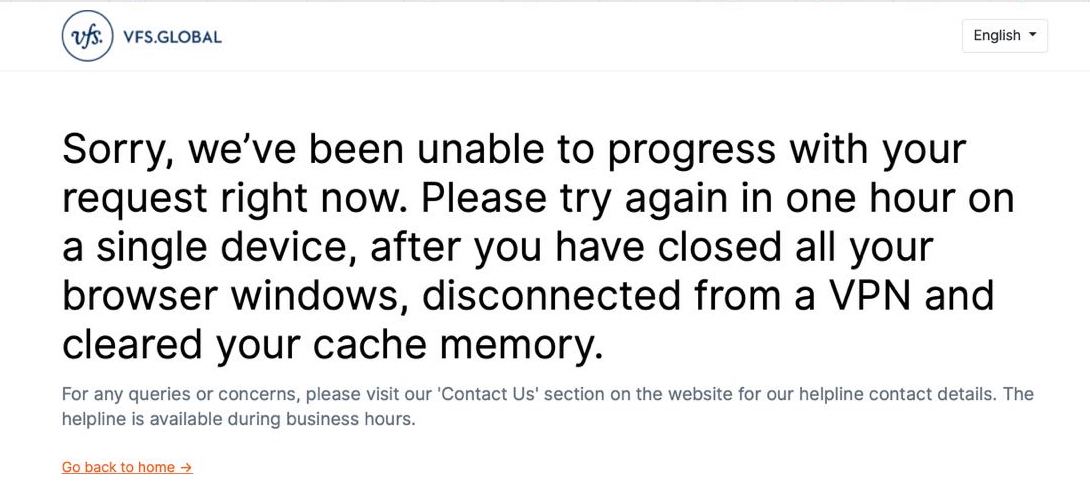
VFS Global Website Issues 2026: Errors, Fixes and Booking Troubleshooting
Reviewed by Visard Visa Operations Team · Last updated: 21 May 2026 · Based on real-world VFS, TLScontact, and BLS booking patterns 2025–2026.
The most common VFS Global website errors in 2026 are: the “Sorry, you have either” login lockout, payment failures (typically because a slot was just taken by another user), session timeouts during long form submissions, and CAPTCHA verification loops. Most issues are resolved by clearing browser cache, switching IP address (VPN or different network), using a different browser, or restarting your modem to renew your IP. Beyond technical fixes, the deeper problem in 2026 is that even when the website works, available appointment slots disappear within seconds in London, Dublin, Dubai, Abu Dhabi, and Istanbul. This guide covers every common error, the proven fixes, and how Visard's automated booking bypasses the manual-refresh problem entirely.
Common VFS Global Website Errors in 2026
Error 1: “Sorry, you have either…” Login Lockout
This error appears when VFS Global blocks your IP address temporarily, usually after too many login attempts or rapid page refreshes during appointment hunting.
Proven fixes (try in order):
Log in from a different device (mobile data instead of WiFi, or vice versa)
Switch network — your mobile hotspot has a different IP than home WiFi
Use a VPN connection (any reputable VPN works; choose a server in your country of residence)
Restart your modem to potentially assign a new IP address
Clear browser cache and cookies, then wait at least 2 hours before attempting again
Switch to a different browser (Chrome → Firefox → Safari → Edge)
Complete the Schengen visa application online form in a single session — avoid abrupt browser closures or tab switches
Error 2: Cannot Make the Payment
Payment failures typically mean the slot you selected has already been booked by another applicant. Due to a VFS system glitch, a slot may still appear available on your screen even though it's been taken seconds before you reached payment.
What to do:
Don't keep retrying the same slot — it's gone
Return to the appointment calendar and refresh
Check if other dates have opened up
Try a different VFS centre in your country (e.g., London → Manchester, Istanbul → Ankara)
Better: use Visard's automated booking which monitors every 3 seconds and books slots faster than manual browsers can react
Error 3: Session Timeout During Application Form
VFS, TLScontact, and BLS portals time out after periods of inactivity — usually 15–20 minutes. If you save progress on the form and step away, returning may force a full re-login.
Prevention:
Complete the entire form in one session if possible
Have all your documents and details ready before starting
If saving drafts: log back in within the same browser session
For long forms (Belgium VOW, Hungarian AS Visa): print the form and fill offline first
Error 4: CAPTCHA Verification Loops
Continuous CAPTCHA challenges that never accept your input. Usually triggered by VPN use that's blocked by the portal, or by browser cookie issues.
Fixes:
Disable VPN temporarily for the booking session
Clear cookies for the VFS/TLS/BLS domain only
Disable browser ad blockers and privacy extensions for that session
Try a different browser without extensions
Allow third-party cookies for the booking portal
Error 5: “Slot Not Available” After Selecting Date
You select a date showing available slots, but clicking through returns “no slots” or sends you back to the calendar. The slot was taken between your page load and click.
What to do: This is the core problem with manual booking in 2026. Slots are taken within seconds of release. Use Visard's automated booking which detects new slots in 3 seconds and books them instantly.
Error 6: Page Won't Load / Server Error
VFS portals occasionally suffer server outages, especially during peak release windows (often Monday mornings local time).
Fixes:
Wait 10–15 minutes and retry
Check VFS Global's official social media for outage announcements
Avoid checking during the first hour after typical slot releases
What Changed for 2026 Booking Portals
VFS Global website redesign in 2025 introduced new captcha behaviour. Old browser extensions may now block valid logins.
EU VAP rollout (2026) doesn't yet affect VFS portals — France, Italy, Estonia have separate online channels but VFS continues for most countries.
EES (Entry/Exit System) integration doesn't change VFS booking. EES affects only border experience after visa is issued.
Mobile app stability improved in 2025 for VFS Global — try the VFS app if web browser keeps failing.
Multi-factor authentication rolled out across most VFS portals — ensure you have access to your registered email and phone.
The Real Problem: Appointment Slot Scarcity
Beyond technical errors, the deeper issue in 2026 is that VFS, TLS, and BLS centres release slots sporadically and they're taken within seconds. Manual refreshing rarely works in:
London VFS (France, Italy, Netherlands, Spain): slots taken within 5–10 seconds
Dublin VFS Global: slots taken within 10–20 seconds
Dubai VFS Global: slots taken within 5–15 seconds
Abu Dhabi VFS Global: slots taken within 15–30 seconds
Istanbul VFS / AS Visa: slots taken within 10–20 seconds
Even with perfect documentation and a working VFS website, the slot-availability bottleneck dominates. This is what Visard automation solves.
Visard Data — VFS Website Patterns (2025–2026)
Most common login error during peak booking windows: “Sorry, you have either” (IP blocking)
Highest payment failure rate: Tuesday and Friday mornings (peak slot release)
Browser with fewest VFS issues: Chrome on desktop (followed by Firefox)
Mobile booking success rate: lower than desktop due to session timeout sensitivity
VPN-related blocks: 23% of users report CAPTCHA loops when using VPN
How to Successfully Book a VFS Appointment in 2026
Prepare your documents first using our complete document checklist
Pre-fill your application form offline so you don't lose progress to timeouts. See our Annex I field-by-field guide
Use Visard's automated booking to bypass the manual slot hunt
When booking manually: use Chrome on desktop, disable extensions, no VPN, stable home WiFi
Have payment method ready (credit card not requiring 3D Secure if possible)
If booking for family: book each person separately — VFS doesn't allow group bookings
How Visard Automates Past These Technical Issues
Visard's automated appointment service monitors official VFS Global, TLScontact, and BLS portals every 3 seconds. When a slot opens, the system either:
Notification service: sends an instant Telegram alert so you can manually book
Auto-booking service: secures the slot automatically using your pre-saved details — pay-after-success model
Browse Visard services by your country of residence:
Audience-Specific Booking Centres
UK Residents
VFS Global centres in London, Manchester, Edinburgh, Cardiff, and Belfast. TLScontact for France and Germany. BLS International for Spain. London centres have highest competition; Manchester and Edinburgh slightly less crowded. See UK Schengen visa guide.
UAE Residents
VFS Global Dubai and Abu Dhabi. You can apply at either regardless of which emirate issued your residence. Dubai has higher volume. See UAE Schengen visa guide.
Ireland Residents
VFS Global Dublin is the primary centre. Sporadic slot releases. See Ireland Schengen visa guide.
Turkey Residents
VFS Global Istanbul, Ankara, Izmir. AS Visa Solutions (Istanbul) for Hungary specifically. iData for some countries. Istanbul has highest volume. See Turkey Schengen visa guide.
Frequently Asked Questions — VFS Website Issues
Why does VFS show slots available but reject my booking at payment?
A system glitch: the slot was taken between your page load and your click. The VFS calendar refreshes slowly, so taken slots may still appear available momentarily. Use Visard automation to catch slots within 3 seconds of release.
Can I use a VPN to apply for a Schengen visa via VFS?
VPN can both help (resolving IP blocks) and hurt (triggering CAPTCHA loops). If you face login issues, try VPN. If you face CAPTCHA loops, disable VPN.
Why does the VFS form session time out so quickly?
VFS portals time out after 15–20 minutes of inactivity for security reasons. Complete the form in one session or save drafts within the same login.
How long do VFS appointment slots remain available in 2026?
5–30 seconds typically. London VFS slots disappear in 5–10 seconds. Istanbul and Dubai in 10–20 seconds. Manual booking rarely succeeds during peak season.
Does the VFS mobile app work better than the website?
The mobile app stability improved in 2025 but session timeouts and form complexity make desktop browsers preferable for the application form. Use mobile for tracking and notifications.
What if I keep getting “Sorry, you have either” error?
Your IP is temporarily blocked. Switch network (mobile data → WiFi, or use a VPN), clear cookies, wait 2 hours minimum, then retry. If persistent, contact VFS support.
Can I book a Schengen visa appointment without using VFS Global?
Depends on the destination country. France and Germany use TLScontact (not VFS). Spain uses BLS. Belgium uses its own VOW portal. Hungary (from Turkey) uses AS Visa Solutions. See our application form portal list.
Will Visard fix VFS technical issues or just notify me of slots?
Visard's auto-booking service handles slot detection and reservation automatically. If the VFS payment fails due to a system glitch, Visard retries automatically. You don't need to troubleshoot VFS errors yourself.
Related Guides
Key Takeaways
Most common VFS error: “Sorry, you have either” (IP block) — fix with VPN or network switch
Payment failure usually means slot taken by another user in the same instant
Session timeouts: complete form in one session, don't step away
Manual booking rarely works in 2026 — slots taken in 5–30 seconds
Visard automation books in 3 seconds, bypassing the manual problem entirely
VPN can help with IP blocks but cause CAPTCHA loops — toggle as needed
Chrome on desktop has the highest VFS success rate
VFS Global Website Issues 2026: Errors, Fixes and Booking Troubleshooting
Reviewed by Visard Visa Operations Team · Last updated: 21 May 2026 · Based on real-world VFS, TLScontact, and BLS booking patterns 2025–2026.
The most common VFS Global website errors in 2026 are: the “Sorry, you have either” login lockout, payment failures (typically because a slot was just taken by another user), session timeouts during long form submissions, and CAPTCHA verification loops. Most issues are resolved by clearing browser cache, switching IP address (VPN or different network), using a different browser, or restarting your modem to renew your IP. Beyond technical fixes, the deeper problem in 2026 is that even when the website works, available appointment slots disappear within seconds in London, Dublin, Dubai, Abu Dhabi, and Istanbul. This guide covers every common error, the proven fixes, and how Visard's automated booking bypasses the manual-refresh problem entirely.
Common VFS Global Website Errors in 2026
Error 1: “Sorry, you have either…” Login Lockout
This error appears when VFS Global blocks your IP address temporarily, usually after too many login attempts or rapid page refreshes during appointment hunting.
Proven fixes (try in order):
Log in from a different device (mobile data instead of WiFi, or vice versa)
Switch network — your mobile hotspot has a different IP than home WiFi
Use a VPN connection (any reputable VPN works; choose a server in your country of residence)
Restart your modem to potentially assign a new IP address
Clear browser cache and cookies, then wait at least 2 hours before attempting again
Switch to a different browser (Chrome → Firefox → Safari → Edge)
Complete the Schengen visa application online form in a single session — avoid abrupt browser closures or tab switches
Error 2: Cannot Make the Payment
Payment failures typically mean the slot you selected has already been booked by another applicant. Due to a VFS system glitch, a slot may still appear available on your screen even though it's been taken seconds before you reached payment.
What to do:
Don't keep retrying the same slot — it's gone
Return to the appointment calendar and refresh
Check if other dates have opened up
Try a different VFS centre in your country (e.g., London → Manchester, Istanbul → Ankara)
Better: use Visard's automated booking which monitors every 3 seconds and books slots faster than manual browsers can react
Error 3: Session Timeout During Application Form
VFS, TLScontact, and BLS portals time out after periods of inactivity — usually 15–20 minutes. If you save progress on the form and step away, returning may force a full re-login.
Prevention:
Complete the entire form in one session if possible
Have all your documents and details ready before starting
If saving drafts: log back in within the same browser session
For long forms (Belgium VOW, Hungarian AS Visa): print the form and fill offline first
Error 4: CAPTCHA Verification Loops
Continuous CAPTCHA challenges that never accept your input. Usually triggered by VPN use that's blocked by the portal, or by browser cookie issues.
Fixes:
Disable VPN temporarily for the booking session
Clear cookies for the VFS/TLS/BLS domain only
Disable browser ad blockers and privacy extensions for that session
Try a different browser without extensions
Allow third-party cookies for the booking portal
Error 5: “Slot Not Available” After Selecting Date
You select a date showing available slots, but clicking through returns “no slots” or sends you back to the calendar. The slot was taken between your page load and click.
What to do: This is the core problem with manual booking in 2026. Slots are taken within seconds of release. Use Visard's automated booking which detects new slots in 3 seconds and books them instantly.
Error 6: Page Won't Load / Server Error
VFS portals occasionally suffer server outages, especially during peak release windows (often Monday mornings local time).
Fixes:
Wait 10–15 minutes and retry
Check VFS Global's official social media for outage announcements
Avoid checking during the first hour after typical slot releases
What Changed for 2026 Booking Portals
VFS Global website redesign in 2025 introduced new captcha behaviour. Old browser extensions may now block valid logins.
EU VAP rollout (2026) doesn't yet affect VFS portals — France, Italy, Estonia have separate online channels but VFS continues for most countries.
EES (Entry/Exit System) integration doesn't change VFS booking. EES affects only border experience after visa is issued.
Mobile app stability improved in 2025 for VFS Global — try the VFS app if web browser keeps failing.
Multi-factor authentication rolled out across most VFS portals — ensure you have access to your registered email and phone.
The Real Problem: Appointment Slot Scarcity
Beyond technical errors, the deeper issue in 2026 is that VFS, TLS, and BLS centres release slots sporadically and they're taken within seconds. Manual refreshing rarely works in:
London VFS (France, Italy, Netherlands, Spain): slots taken within 5–10 seconds
Dublin VFS Global: slots taken within 10–20 seconds
Dubai VFS Global: slots taken within 5–15 seconds
Abu Dhabi VFS Global: slots taken within 15–30 seconds
Istanbul VFS / AS Visa: slots taken within 10–20 seconds
Even with perfect documentation and a working VFS website, the slot-availability bottleneck dominates. This is what Visard automation solves.
Visard Data — VFS Website Patterns (2025–2026)
Most common login error during peak booking windows: “Sorry, you have either” (IP blocking)
Highest payment failure rate: Tuesday and Friday mornings (peak slot release)
Browser with fewest VFS issues: Chrome on desktop (followed by Firefox)
Mobile booking success rate: lower than desktop due to session timeout sensitivity
VPN-related blocks: 23% of users report CAPTCHA loops when using VPN
How to Successfully Book a VFS Appointment in 2026
Prepare your documents first using our complete document checklist
Pre-fill your application form offline so you don't lose progress to timeouts. See our Annex I field-by-field guide
Use Visard's automated booking to bypass the manual slot hunt
When booking manually: use Chrome on desktop, disable extensions, no VPN, stable home WiFi
Have payment method ready (credit card not requiring 3D Secure if possible)
If booking for family: book each person separately — VFS doesn't allow group bookings
How Visard Automates Past These Technical Issues
Visard's automated appointment service monitors official VFS Global, TLScontact, and BLS portals every 3 seconds. When a slot opens, the system either:
Notification service: sends an instant Telegram alert so you can manually book
Auto-booking service: secures the slot automatically using your pre-saved details — pay-after-success model
Browse Visard services by your country of residence:
Audience-Specific Booking Centres
UK Residents
VFS Global centres in London, Manchester, Edinburgh, Cardiff, and Belfast. TLScontact for France and Germany. BLS International for Spain. London centres have highest competition; Manchester and Edinburgh slightly less crowded. See UK Schengen visa guide.
UAE Residents
VFS Global Dubai and Abu Dhabi. You can apply at either regardless of which emirate issued your residence. Dubai has higher volume. See UAE Schengen visa guide.
Ireland Residents
VFS Global Dublin is the primary centre. Sporadic slot releases. See Ireland Schengen visa guide.
Turkey Residents
VFS Global Istanbul, Ankara, Izmir. AS Visa Solutions (Istanbul) for Hungary specifically. iData for some countries. Istanbul has highest volume. See Turkey Schengen visa guide.
Frequently Asked Questions — VFS Website Issues
Why does VFS show slots available but reject my booking at payment?
A system glitch: the slot was taken between your page load and your click. The VFS calendar refreshes slowly, so taken slots may still appear available momentarily. Use Visard automation to catch slots within 3 seconds of release.
Can I use a VPN to apply for a Schengen visa via VFS?
VPN can both help (resolving IP blocks) and hurt (triggering CAPTCHA loops). If you face login issues, try VPN. If you face CAPTCHA loops, disable VPN.
Why does the VFS form session time out so quickly?
VFS portals time out after 15–20 minutes of inactivity for security reasons. Complete the form in one session or save drafts within the same login.
How long do VFS appointment slots remain available in 2026?
5–30 seconds typically. London VFS slots disappear in 5–10 seconds. Istanbul and Dubai in 10–20 seconds. Manual booking rarely succeeds during peak season.
Does the VFS mobile app work better than the website?
The mobile app stability improved in 2025 but session timeouts and form complexity make desktop browsers preferable for the application form. Use mobile for tracking and notifications.
What if I keep getting “Sorry, you have either” error?
Your IP is temporarily blocked. Switch network (mobile data → WiFi, or use a VPN), clear cookies, wait 2 hours minimum, then retry. If persistent, contact VFS support.
Can I book a Schengen visa appointment without using VFS Global?
Depends on the destination country. France and Germany use TLScontact (not VFS). Spain uses BLS. Belgium uses its own VOW portal. Hungary (from Turkey) uses AS Visa Solutions. See our application form portal list.
Will Visard fix VFS technical issues or just notify me of slots?
Visard's auto-booking service handles slot detection and reservation automatically. If the VFS payment fails due to a system glitch, Visard retries automatically. You don't need to troubleshoot VFS errors yourself.
Related Guides
Key Takeaways
Most common VFS error: “Sorry, you have either” (IP block) — fix with VPN or network switch
Payment failure usually means slot taken by another user in the same instant
Session timeouts: complete form in one session, don't step away
Manual booking rarely works in 2026 — slots taken in 5–30 seconds
Visard automation books in 3 seconds, bypassing the manual problem entirely
VPN can help with IP blocks but cause CAPTCHA loops — toggle as needed
Chrome on desktop has the highest VFS success rate
Related posts
Latvia Schengen Visa Requirements UK: 2026 Complete Guide
Switzerland Visa Requirements UK: Complete 2026 Guide
Slovenia Visa Requirements UK: 2026 Complete Guide
Cyprus Visa Requirements UK: Complete 2026 Guide
Lithuania Visa Requirements UK: Complete 2026 Guide

Iceland Schengen Visa Requirements UK: 2026 Guide
Finland Visa Requirements UK: Complete 2026 Guide
Bulgaria Schengen Visa Requirements UK: 2026 Guide
Estonia Schengen Visa from UK: Requirements & Guide 2026

Croatia Visa Requirements UK: Complete 2026 Guide
Related posts
Related posts